Control (logical) structures mentioned here are primarily useful for writing programs; for command-line interactive work, the “apply” functions are more useful.
19.1 Logical expressions
A logical expression is formed using:
the comparison operators< , > , <=, >=, == (equal to), != (not equal to), &&, || (sequentially evaluated versions of & and |, respectively).
the logical operators& (and), | (or), ! (not), xor() is exclusive or (i.e xor(x, y) is true if x is true, or y is true, but not both).
As well as & and |, R also has && and ||. Don’t use them in dplyr functions! These are called short-circuiting operators and only ever return a single TRUE or FALSE. They’re important for programming, not data science.
Figure 10 shows the complete set of Boolean operations and how they work: Figure 10. The complete set of Boolean operations. x is the left-hand circle, y is the right-hand circle, and the shaded regions show which parts each operator selects
Example:
# Find all rows where x is not missingdf |>filter(!is.na(x))# Find all rows where x is smaller than -10 or bigger than 0df |>filter(x <-10| x >0)
The order of operations can be controlled using parentheses ( ).
The value of a logical expression is either TRUE or FALSE (the integers 1 and 0 can also be used to represent TRUE and FALSE, respectively).
Example:
## Note that A|B is TRUE if A or B or both are TRUEc(0,0,1,1)|c(0,1,0,1)
[1] FALSE TRUE TRUE TRUE
## If you want exclusive disjunction, that is either A or B is TRUE but not both, then use xor(A,B)xor(c(0,0,1,1), c(0,1,0,1))
[1] FALSE TRUE TRUE FALSE
19.1.1 Order of operations
Note that the order of operations doesn’t work like English. Take the following code that finds all flights that departed in November or December:
flights |>filter(month ==11| month ==12)
You might be tempted to write it like you’d say in English: “Find all flights that departed in November or December.”:
flights |>filter(month ==11|12)
This code doesn’t error but it also doesn’t seem to have worked. What’s going on? Here, R first evaluates month == 11 creating a logical vector, which we call nov. It computes nov | 12. When you use a number with a logical operator it converts everything apart from 0 to TRUE, so this is equivalent to nov | TRUE which will always be TRUE, so every row will be selected:
flights |>mutate(nov = month ==11,final = nov |12,.keep ="used" )
19.1.2 %in%
An easy way to avoid the problem of getting your ==s and |s in the right order is to use %in%. x %in% y returns a logical vector the same length as x that is TRUE whenever a value in x is anywhere in y.
To evaluate x & y, R first evaluates x and y, then returns TRUE if x and y are both TRUE, FALSE otherwise.
To evaluate x && y, R first evaluates x. If x is FALSE then R returns FALSE without evaluating y. If x is TRUE then R evaluates y and returns TRUE if y is TRUE, FALSE otherwise.
Sequential evaluation of x and y is useful when y is not always well defined, or when y takes a long time to compute.
Note that && and || only work on scalars, whereas & and | work on vectors on an element-by-element basis.
19.1.4 Index position
If you wish to know the index positions of TRUE elements of a logical vector x, then use which(x):
Example:
x <-c(1, 1, 2, 3, 5, 8, 13)which(x %%2==0)
[1] 3 6
19.2 if-else
A natural extension of the if command includes an else part. Braces{ } are used to group together one or more expressions. If there is only one expression then the braces are optional.
When an if expression is evaluated, iflogical_expression is TRUE then the first group of expressions is executed and the second group of expressions is not executed. Conversely, iflogical_expression is FALSE then only the second group of expressions is executed.:
if (logical_expression) { expression_1 # do something ...} else { expression_2 # do something different ...}
dplyr’s case_when() is inspired by SQL’s CASE statement and provides a flexible way of performing different computations for different conditions. It takes pairs that look like condition ~ output. condition must be a logical vector; when it’s TRUE, output will be used.
This means we could recreate our previous nested if_else() as follows:
x <-c(-3:3, NA)case_when( x ==0~"0", x <0~"-ve", x >0~"+ve",is.na(x) ~"???")
[1] "-ve" "-ve" "-ve" "0" "+ve" "+ve" "+ve" "???"
19.3 Comparisions
A very common way to create a logical vector is via a numeric comparison with <, <=, >, >=, !=, and ==. For example, the following filter finds all daytime departures that arrive roughly on time:
You can also use mutate() to explicitly create the underlying logical variables and add more intermediate steps to make it easier to both read your code and check that each step has been computed correctly.
The following functions describe some useful techniques for summarizing logical vectors. There are two main logical summaries: any() and all():
any(x) is the equivalent of |; it’ll return TRUE if there are any TRUE’s in x.
all(x) is equivalent of &; it’ll return TRUE only if all values of x are TRUE’s. Like all summary functions, they’ll return NA if there are any missing values present, and as usual you can make the missing values go away with na.rm = TRUE.
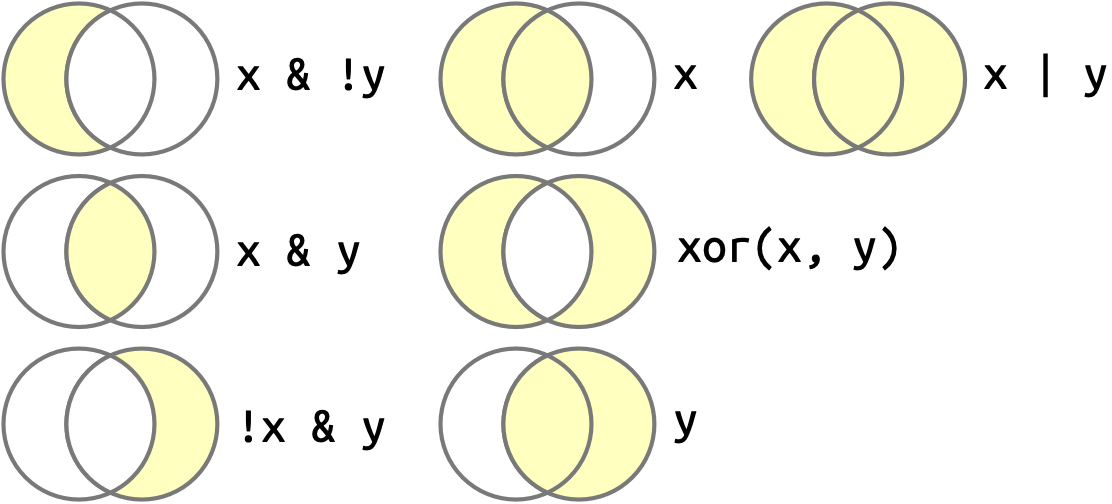 Figure 10. The complete set of Boolean operations. x is the left-hand circle, y is the right-hand circle, and the shaded regions show which parts each operator selects